DOCUMENT WORKFLOW AUTOMATION
Automate the work of reading, checking, and organizing documents
We design workflows that extract data from PODs and invoices, compare it with existing system records, and surface matches, gaps, and exceptions in one place.
We review the right scope for your documents, rules, and systems.
PROBLEM
Your documents are digital. Is the work still manual?
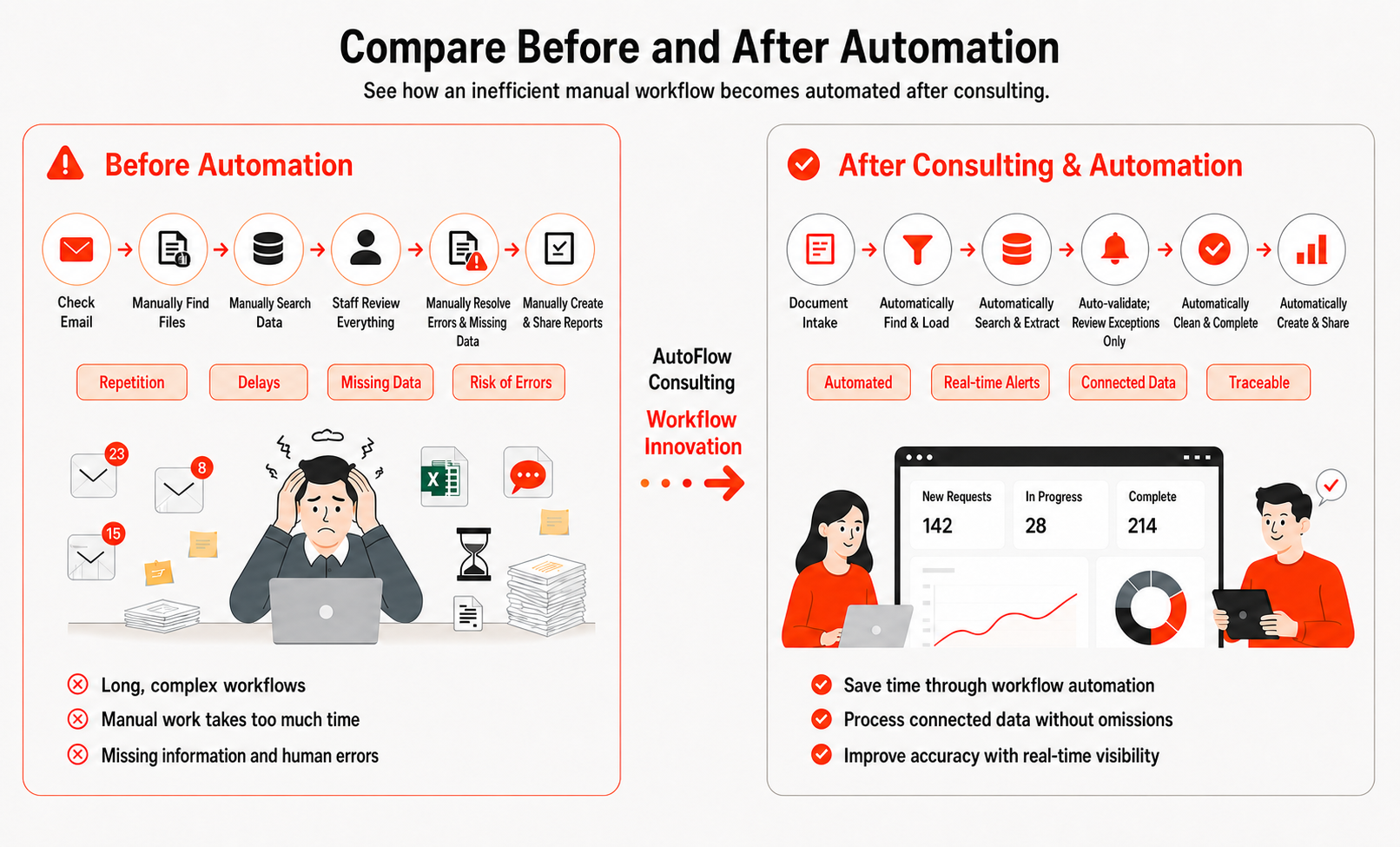
Work keeps waiting while people open attachments, locate values, re-enter them, search systems, and chase missing information.
- Repeated entry
- Tool switching
- Review delays
- Missing data & errors
- No shared status
WORKFLOW TRANSFORMATION
Move from processing every document to managing only exceptions
Automation consulting is not about adding OCR alone. It redesigns the rules, flow, and ownership between documents and systems.
People review every document
- Manual field entry
- Manual record lookup
- Fragmented tools
- Individual status checks
Design rules and connections
- Map the current process
- Define extraction fields
- Set validation rules
- Choose integration paths
People review exceptions
- Classify documents
- Extract and structure data
- Compare source records
- Route normal and exception cases
Could this work for your process?
Check your automation potentialDOCUMENT TO DATA
Organize a full day of manual work in one automated flow
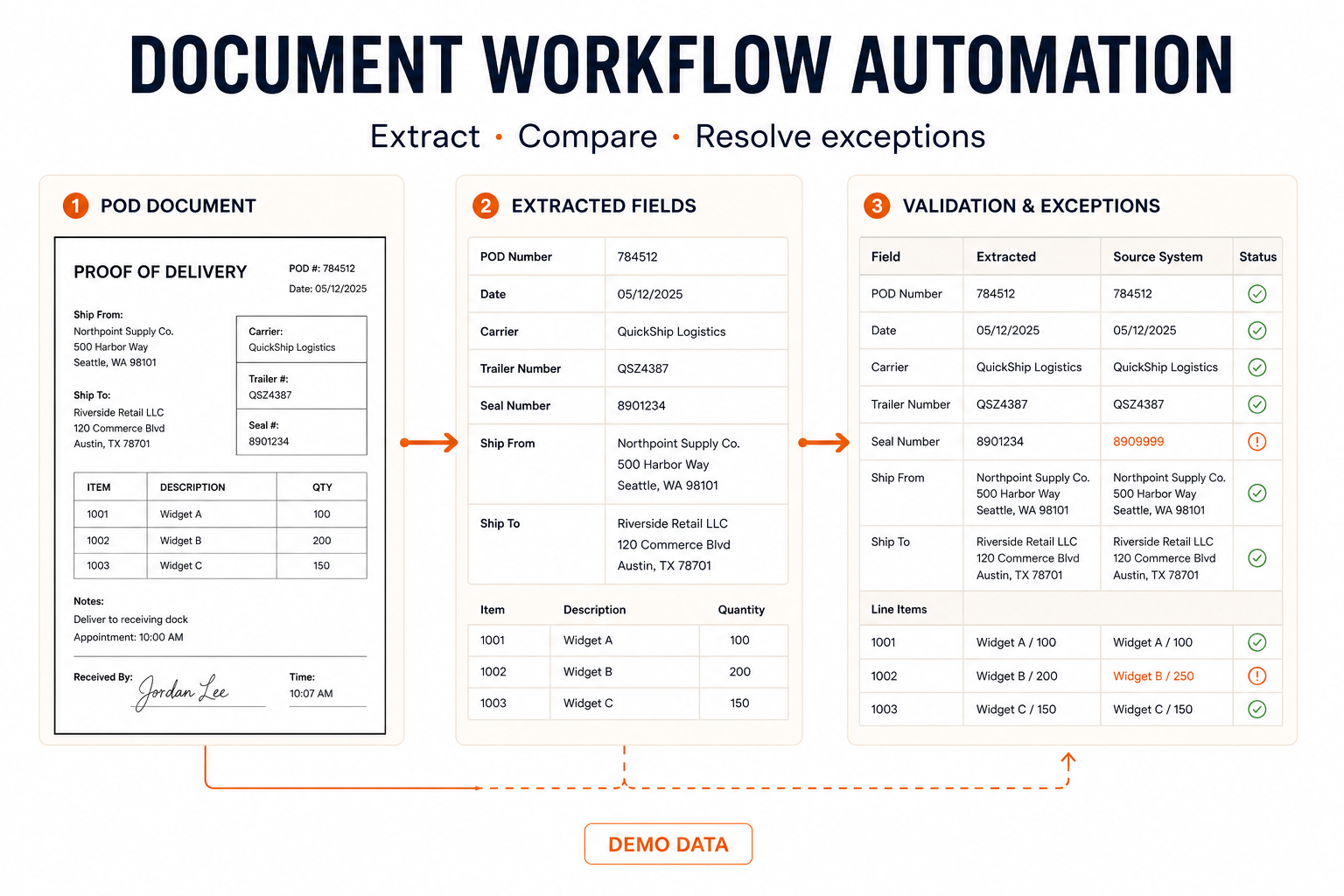
Different documents can follow the same extract → structure → compare → flag → store workflow.
PROOF OF DELIVERY
Delivery record
EXTRACT & STRUCTURE
POD data comparison
Extract shipment and delivery data and compare it with order and delivery records.
VALIDATION
Compare reference data
Extraction fields, validation rules, and integration scope vary by workflow.
OPERATIONAL OUTCOMES
The value of automation appears across the operation—not only in data entry speed
We show the connection between workflow capabilities and business outcomes without inventing performance numbers.
CAUSE → OUTCOME
Less repetitive work
HOW IT WORKS
We start by understanding how the work runs today
We define the right scope first, then design connections using real documents, rules, and exceptions.
Discuss the right scope- 01
Map documents and workflow
Understand intake channels, document types, rules, and exceptions.
Concept preview · Demo dataProcess map - 02
Define fields and validation
Agree on required values and match/mismatch rules.
Concept preview · Demo dataField definition - 03
Design structure and integration
Define output formats, destinations, and connection methods.
Concept preview · Demo dataIntegration map - 04
Test and tune exceptions
Review normal and exception paths with representative samples.
Concept preview · Demo dataValidation rules - 05
Monitor and improve
Review outcomes and exceptions, then refine rules where needed.
Concept preview · Demo dataStatus view
Actual phases, timing, and support scope are defined after consultation.
TRUST & FAQ
Questions worth answering before implementation
Can you process documents with changing layouts?
We determine the feasible range after reviewing representative documents and layout variation. We do not promise accuracy before understanding the inputs.
What happens when OCR is wrong?
We can review a combination of confidence, validation rules, and source-system comparisons, then separate items that need human attention. The exact approach depends on scope.
Which document types are supported?
PODs and invoices are representative examples. We assess other documents based on structure and the fields your workflow needs.
How are documents and data protected?
Storage, encryption, access control, retention, and deletion must be defined for the customer and implementation environment. We do not claim certifications that have not been confirmed.
How are timing and cost determined?
They depend on document types, volume, rule complexity, and integrations. We do not promise a fixed timeline or ROI before assessment.
START A CONVERSATION
Find where automation can remove repetitive document work
Tell us which documents you process, how work is handled today, and which systems need to connect.
- 1Review your request
- 2Assess the scope
- 3Consult
LIMITED PARTNER PROGRAM
Promotion for 10 partner companies
Based on 500 pages · 10 fields- Requires anonymized portfolio use and performance validation cooperation
- Eligibility and detailed benefits are confirmed after consultation